Fall deeper into the
K-content you love
Korwid makes it fun — study Korean with the shows and idols you follow
Learning with my faves
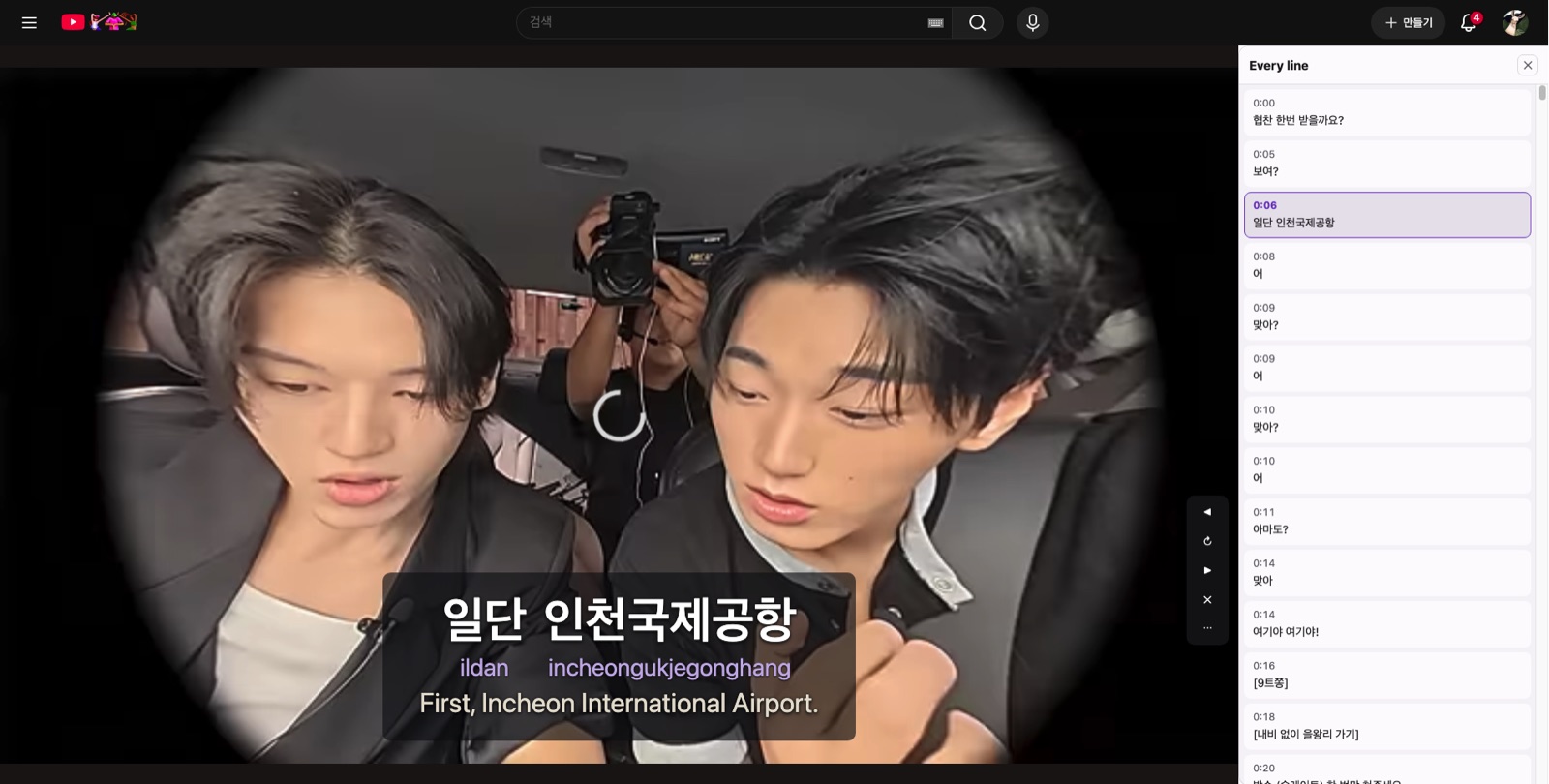
Every line of these clips is written out. Tap one to jump straight to it, hold to put it on repeat, drop the speed to 0.5×, and hide the Korean once you can keep up.
 ▶ Study52:14[BTS VLOG] V — DRIVE VLOG
 ▶ Study44:44Kkangkkang NetRunning Man
 ▶ Study24:30돌들의침묵 — 베이비몬스터BABYMONSTER
 ▶ Study31:35살롱드립2 EP.27 — 에스파 카리나aespa
 ▶ Study28:58CORTIS — 놀이공원CORTIS
 ▶ Study19:07About Jeans — Chicago shopping dayNewJeans
 ▶ Study31:54Salon Drip 2 EP.11 — Joo Woo-jaeSalon Drip 2
 ▶ Study11:32코노돌 EP.44 — 스트레이 키즈Stray Kids
 ▶ Study30:35TO DO X TXT EP.94 — HUENINGKAI's Day 1TXT
 ▶ Study36:59살롱드립2 EP.79 — 제로베이스원 성한빈·장하오ZEROBASEONE
 ▶ Study47:14Dolbagiil EP.31-1 — b-boying and shootingENHYPEN
 ▶ Study28:13The maknae takes the top rank?BOYNEXTDOOR
- See all 102 →
Can’t find the video you want?
We wrote scripts for 102 clips. The extension puts the same readings, pronunciation and speech-level cues on any YouTube video — and on Netflix once you turn it on.
Add the free extensionChrome · free · no account needed
Read up on the Korean you just heard
All articles →Learning Korean with Netflix
Korean titles on Netflix right now — refreshed every week
Readings, pronunciation and speech-level badges, drawn straight on the Netflix subtitles you’re already watching.

















 1
1Teach You a Lesson
IMDb rating 8.4 out of 1063.0M views2026ActionComedy 2
2Agent Kim Reactivated
IMDb rating 7.6 out of 1050.4M views2026ThrillerCrime 3
3My Royal Nemesis
IMDb rating 7.5 out of 1027.6M views2026Sci-FiFantasy 4
4Bloodhounds
IMDb rating 8.2 out of 1026.0M views2023SportThriller 5
5Spooky in Love
IMDb rating 7.5 out of 1021.5M views2026HorrorSci-Fi 6
6Sold Out on You
IMDb rating 6.9 out of 1019.9M views2026RomanceComedy
Read along with any Korean title
you put on
Romanization, the real pronunciation, and who they’re being polite to — drawn on Netflix’s own subtitle track.
Add the free extensionSpeech level — who they're talking to
Formal, polite or casual. The thing English subtitles drop entirely.
Pronunciation — what you'll actually hear
Seven sound-change rules, applied automatically to every line.
Dictionary form — words you can look up
들으니까 deureunikka is 듣다 deutda — “to hear”
Common questions
Is Korwid free?
Installing it is free. The free tier covers one title a day and ten sentence breakdowns a month; the paid plans lift the daily limit. See the plans.
Does it work on my phone?
No — it is a Chrome extension, so it needs desktop Chrome. That is the same limit every subtitle-overlay extension has, and it is a real one given how much K-content gets watched on phones. The tool at the top of this page does run in a phone browser.
How is this different from Language Reactor?
Language Reactor gives you the Korean line and a translation. It carries no romanization, no speech level and no sound-change reading — those three are what Korwid adds. We compared the alternatives here.
Do I need to read Hangul already?
No. Every line comes with a romanization, here and under the subtitle. But Hangul itself takes about a weekend and removes that step permanently, so treat the romanization as a crutch you plan to drop.